Media Linking Application Format

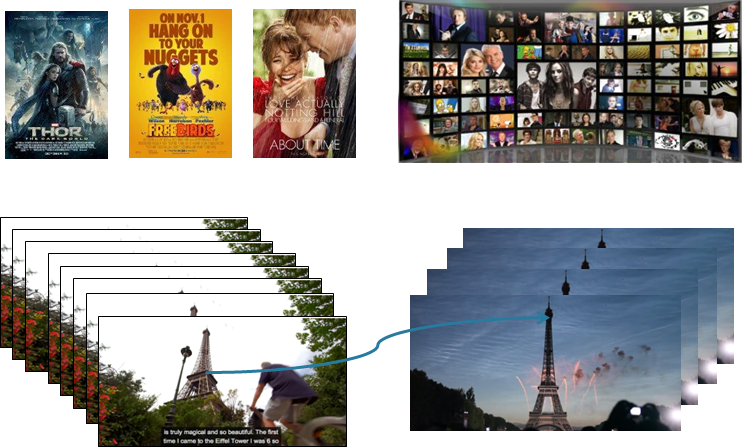
The success of the web has been largely dependent on the possibility to create a link from a point in a document to a point in another document. it is possible to link media but only from and entity to another entity.

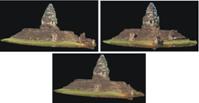
The European FP7 project BRIDGET, of which CEDEO is a partner, has developed the notion of bridget linking from inside a media to inside another media, as illustrated in Figure 1.

Text Video
text_linking video_linking

Figure 1 – Evolution of linking

A bridget can be just a link from a portion of a “source” programme to a single media item but also a series of links from a collection of source programme components (images and video clips) to a set of destination media. More generally a bridget can be a collection of links from a set of source media items to a set of destination media items, e.g.

  1. An image points to an image or a set of images
  2. An object in an image points to an object in an image or to an image or to a set of images
  3. A slide part of a slide show points to audio clip
  4. An audio clip in an audio points to the corresponding score sheet
  5. Different images drawn from a programme point to different web pages
  6. A video clip from a video points to a set of related videos

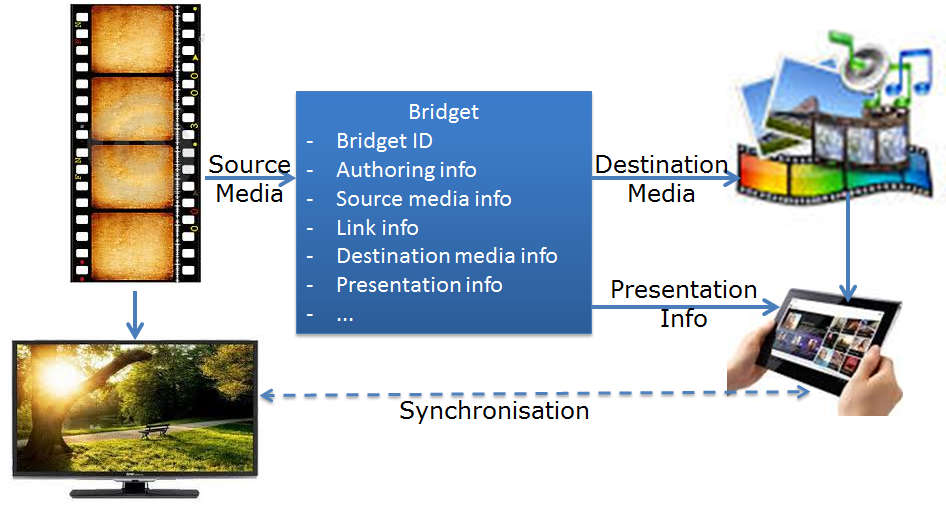
A bridget, however, is not simply a URL, but contains two data structures: one related to the source media item and the other related to the destination media item. It may also contain information on how the bridget itself should be presented to the user.

The figure below depicts the notion of bridget in a specific 2nd screen instance addressed by BRIDGET.

bridgets_for_2nd_screen

Figure 2 – the role of the bridget format

The ISO/IEC 23000-18 Media Linking Application Format (MLAF) standards is about defining the structure of the bridget data type (the blue box in the figure).

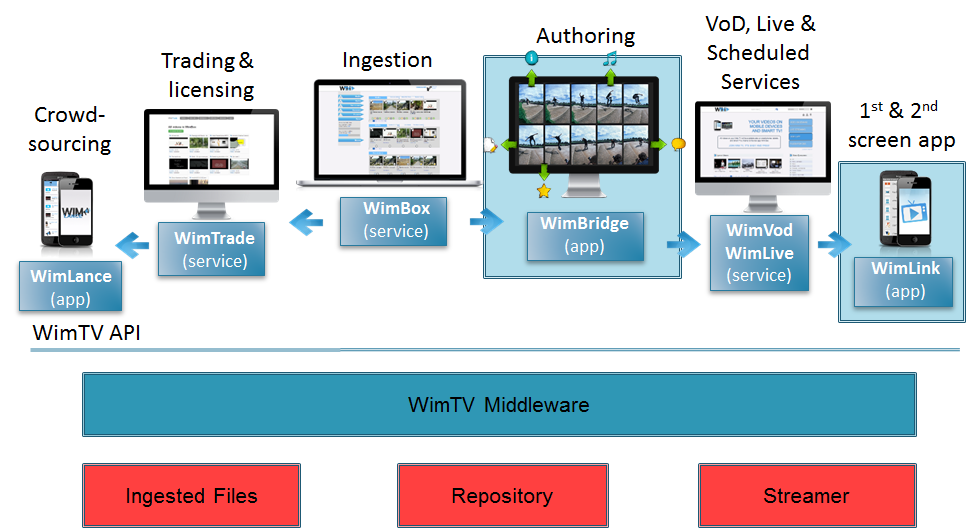
Bridget is a key technology that can enhance the user experience and open new avenues for media exploitation. Figure 3 depicts how WimBridge, a webapp that allows a WimTV user to add bridgets to a video enriches the WimTV.

bridgets-enhanced_WimTV

Figure 3 – WimBridge is added to the WimTV ecosystem

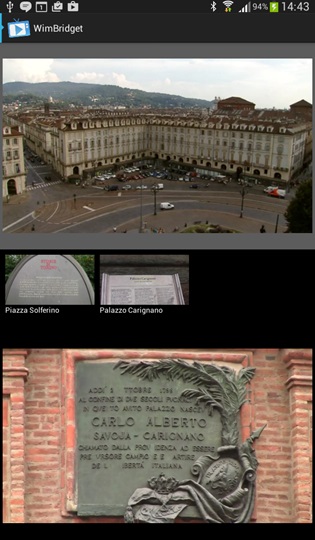
The video enriched with bridgets can then become an element of a WimTV scheduled service that can be consumed on WimLink. the figure below shows the look and feel of the mobile app implementing WimLink.

The screen is divided in 3 windows:

  • Top window: presents the WimTV scheduled services (1st screen) composed of audio and video
  • Middle window: presents abridget as soon as the time for it has arrived. when a user taps a bridget the video of the 2nd screen starts
  • Bottom window: presents the destination video streamed from WimTV. when this is done the audio on the top window is muted. if the user taps the top window again the audio of the bottom window is muted.
WimLink_UX

Figure 4 – the WimLink User Experience


Generic MPEG Technologies

It has always been a point of pride for MPEG to have been able to create the MPEG-1 Audio-Video-Systems package overcoming the informal, but nonetheless effective barriers that used to separate video coding people, audio coding people and those more “engineering minded” that MPEG calls “systems people”. This “package approach” continued with MPEG-2, MPEG-4 and MPEG-7.

The arrival of the AVC standard, disconnected from an audio component and without a specific systems layer – but actually connectable with any audio and usable in MPEG-2 TS and IP – and the appearance of new systems layer technologies and audio compression ideas led to a decision of establishing 3 new “containers” of systems, video and audio standards. the 3 containers were nicknamed MPEG-B (Systems), MPEG-C (Video) and MPEG-D (Audio).

The MPEG-B container has been the place where some significant technologies have been developed (11 active parts). MPEG-C has a more reduced number of components (5), as AVC and later HEVC have included most technologies. MPEG-D has been the place where all new audio coding technologies not related to AAC have been developed until the appearance of 3D Audio.


Generic MPEG Systems Standards

MPEG-B

Part 1 “Binary MPEG format for XML” (BiM) was originally developed a the technology to compress MPEG-7 Descriptors and Description Schemes and placed in MPEG-7 Part 1. BiM was then made a generic technology and moved to MPEG-B part 1. It provides a standard set of generic technologies to transmit and compress XML documents, addressing a broad spectrum of applications and requirements. High compression efficiency is achieved by having a shared knowledge on the schema between encoder and decoder. BiM also provides fragmentation mechanisms for ensuring transmission and processing flexibility.

Part 2 “Fragment Request Unit” specifies a technology enabling a terminal to request XML fragments of immediate interest. This significantly reduces processing and storage requirements at the terminal and can enable applications on constrained devices that would not otherwise be possible.

Part 3 “XML Representation of IPMP-X Messages” provides an XML representation – with extensions – of the IPMP-X messages defined in MPEG-4 part 13.

Part 4 “Codec Configuration Representation” provides a compressed digital representation of a video decoder and of the corresponding bitstream, assuming that the receiving terminal shares a library of video coding tools with the transmitter. Reconfigurable Video Coding gets a more complete treatment later.

Part 5 “Bitstream Syntax Description Language” provides a normative grammar to describe, in XML, the high-level syntax of a bitstream. The resulting XML document is called a Bitstream Syntax Description (BSD). BSD does replace the original binary format and, in most cases, it does not describe the bitstream on a bit-per-bit basis, but rather its high-level structure, e.g., how the bitstream is organized in layers or packets of data. BSD is itself scalable, i.e. it may describe the bitstream at different syntactic layers (e.g., finer or coarser levels of detail), depending on the application. Morea bout this later.

Part 7 “Common Encryption for ISO Base Media File Format Files” specifies encryption and key mapping methods to enable decryption of a file using different Digital Rights Management (DRM) and key management systems. It defines encryption algorithms and encryption related metadata necessary to decrypt the protected streams, but rights mappings, key acquisition and storage, DRM content protection compliance rules, etc., are left to the DRM system(s). For instance, identification of decryption key is done via stored key identifiers (KIDs), but a DRM-specific method specifies how the KID identified decryption key is protected and located.

Part 8 “Coding-independent code-points” collects and defines code points and fields that establish properties of a video or audio stream outside of the compression encoding and bit rate. Examples of properties are the appropriate interpretation of decoded video or audio data or the characteristics of such signals before the signal is compressed by an encoder designed to compress such an input signal.

Part 9 “Common encryption of MPEG-2 transport streams” specifies a common media encryption format for use in MPEG-2 Transport Streams. The encryption format is interoperable with the format MPEG-B Part 7 in the sense that it is possible to convert between encrypted MPEG-2 Transport Streams and encrypted ISO base media file format files without re-encryption.

Part 10 “Carriage of Timed Metadata Metrics of Media in ISO Base Media File Format” specifies the carriage of timed metadata in files belonging to the MPEG file family. The metadata are ‘green’ metadata (related to energy consumption) and quality measurements of the associated media data (related to video quality metrics).

Part 11 “Green Metadata” specifies  the format of the following metadata:

  1. Reduced decoder power consumption
  2. Reduced display power consumption
  3. Media selection for joint decoder and display power reduction
  4. Quality recovery after low-power encoding.

Appropriate use of these metadata help reduce energy usage during media consumption in two modalities: 1) without any degradation in the Quality of Experience (QoE) and 2) with some QoE degradation to get larger energy savings.

Part 12 “Sample variants in the ISO base media file format” defines the carriage of Sample Variants, i.e. assembled media samples replacing an original sample, in MPEG file format files.
.


Generic MPEG Video Standards

MPEG-C

Part 1 “Accuracy specification for implementation of integer-output IDCT” specifies the IDCT accuracy that is equivalent to or extends the IEEE 1180 standard. This standard referenced by quite a few image and video compression standards had been withdrawn and MPEG needed to restore the reference.

Part 2 “Fixed-point 8×8 inverse discrete cosine transform and discrete cosine transform” specifies a particular fixed-point approximation to the ideal 8×8 IDCT and DCT function, fulfilling the 8×8 IDCT conformance requirements for the MPEG-1, MPEG-2 and MPEG-4 part 2 video coding standards.

Part 3 “Auxiliary Video Data Representation” specifies how auxiliary data such as pixel-related depth or parallax values, are to be represented when encoded by MPEG video standards in the same way as ordinary picture data.

Part 4 “Video Tool Library” contains a collection of descriptions of video coding tools, called Functional Units, as referenced in MPEG-B Part 4. Again more about this later.


Generic MPEG Audio Standards

MPEG-D

Part 1 “MPEG Surround” provides an efficient bridge between stereo and multichannel presentations in low-bitrate applications. The MPEG Surround technology supports very efficient parametric coding of multi-channel audio signals, so as to permit transmission of such signals over channels that typically support only transmission of stereo (or even mono) signals. Moreover, MPEG Surround provides complete backward compatibility with non-multichannel audio systems.

Part 2 “Spatial Audio Object Coding” represents several audio objects by first combining the object signals into a mono or stereo signal, whilst extracting parameters from the individual object signals based on knowledge of human perception of the sound stage.  These parameters are coded as a low bitrate side-channel that the decoder uses to render an audio scene from the stereo or mono down-mix, such that the aspects of the output composition can be decided at the time of decoding.

Part 3 “Unified speech and audio coding”, a standard  defining a single technology that codes speech, music, and speech mixed with music, and that is consistently as good as the best of the state-of-the-art speech coders such as Adaptive Multi Rate – WideBand plus (AMR-WB+) and the state-of-the-art music coders (HE-AAC V2) in the 24 kbit/s stereo to 12 kbit/s mono operating range.


Reconfigurable Media Coding

While MPEG was busily developing more and more video compression standards, China decided that it could well afford to have its own national digital audio-video-system technology and in June 2002 established the Audio and Video Coding Standard Workgroup of China (AVS). The group achieved its goal and in December 2003 Wen Gao, the long-time Chinese HoD to MPEG, asked me to have AVS recognised as an MPEG standard.

In spite of our friendship my answer could only be that the recognition as such of external standards was not MPEG policy. On the other hand something that could look like an equivalent result could be conceived.

The request had come at a time I was already reflecting on the fact that, in spite of the MPEG “firepower” in terms of technical expertise and hence of quality of its standards, there were more and more cases of private companies developing their own proprietary codecs. Even though the performance of these was non yet a threat to MPEG’s supremacy, each of these standards had some good elements and, for different reasons, were supported by some service or device.

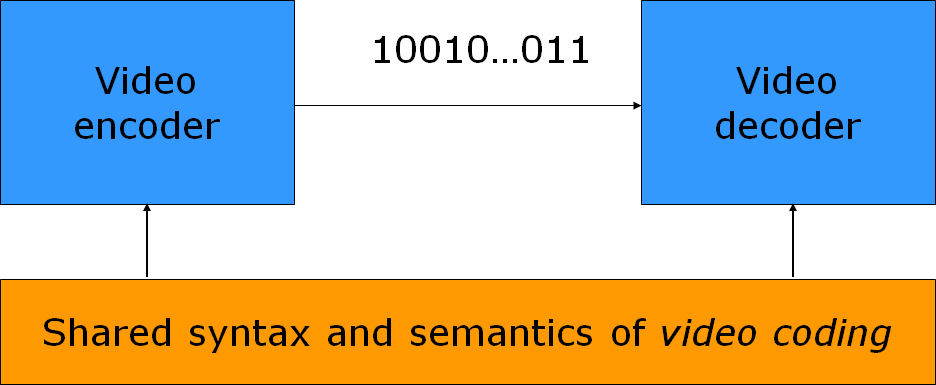
So the idea was to develop a standard that would enable the building of new video codecs starting from some form of standardised tools. Unlike what is done with traditional video coding described in Figure 1 where encoder and decoder share the syntax and the semantics of the video coding algorithm

Basic_VC_model

Figure 1 – Basic Video Coding Model

the intention was to enable the sharing of the syntax and semantics of the way a specific video coding algorithm is described, as depicted in Figure 2.

Basic_RVC_model

Figure 1 – Basic Reconfigurable Video Coding Model

I made this proposal to the Munich meeting (March 2004) and Euee S. Jang agreed to lead the “Reconfigurable Video Coding” group.

The group produced two standards

  1. A language to describe decoders (ISO/IEC 23001-4 or MPEG-B pt. 4)
  2. A library of video coding tools employed in MPEG standards (ISO/IEC 23002-4 or MPEG-C pt. 4).

The language defined in MPEG-B part 4 is RVC-CAL. Using this language one can describe a particular decoder including the connection of video coding tools and the bitstream syntax and parsing.

RVC_implementation

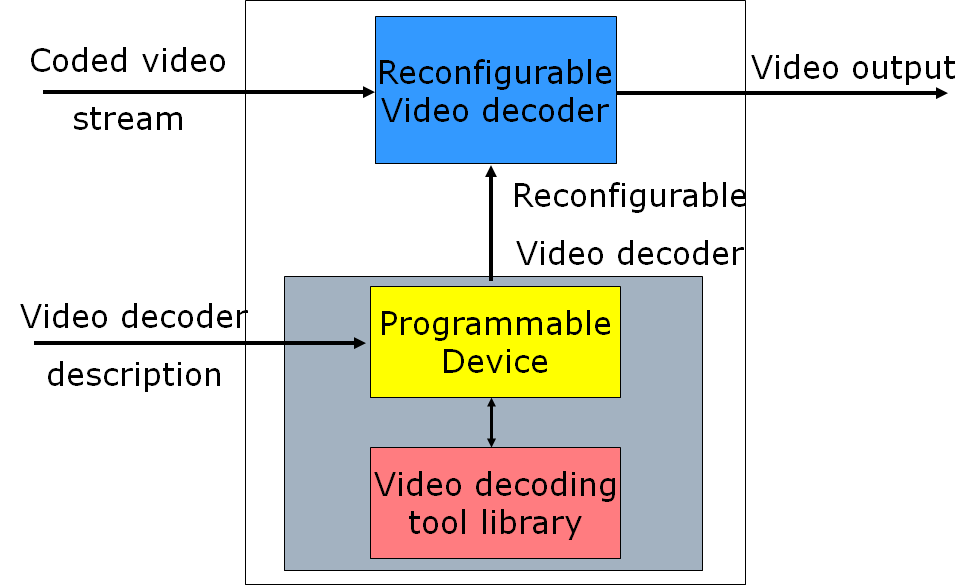
Figure 3 – An implementation of RVC

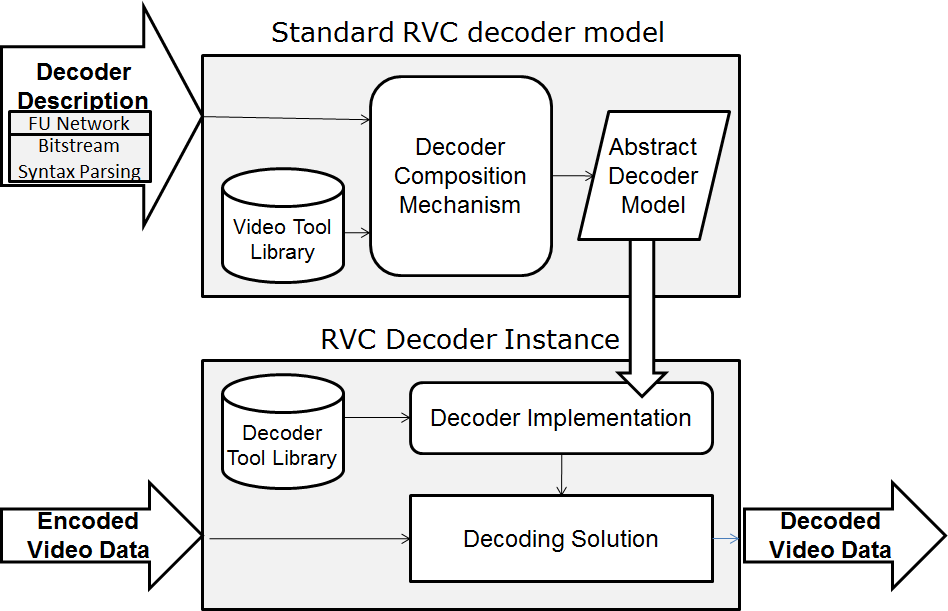
As depicted in Figure 3 a specific RVC decoder is a software built using a Video decoder description that assembles video coding tools drawn from a standard Video decoding tool library. The software would run on a programmable device.

Figure 4 shows how a specific decoding solution can be built using the decoder description and the tools drawn of the Media Tool Library (MPEG-C pt. 4). The Tool-Box is a collection of Functional Units (FUs), i.e. modularised video decoding units.

toolbox&fu

Figure 4 – The RMC Tool-Box and a Functional Unit

The decoder description is given to an RVC decoder which creates an Abstract Decoder Model. From this a decoder implementation is created using an MPEG Tool Library, a repository of video decoding tools for a specific platform.

RVC_solution

Figure 5 – Building an RVC-based decoding solution

The library of MPEG-C pt. 4 is not static as it can be augmented with new tools coming from either MPEG standards or other tools submitted by interested parties to MPEG that have been shown to provide improvements in at least one decoder configuration. Figure 6 shows how an existing decoder (line above) can be updated (line below) by replacing an existing Functional Unit (2nd in 2nd line) and by adding a new Functional Unit (3rd in 2nd line).

decoder_update_management_in_RVC

Figure 6 – RVC decoder update

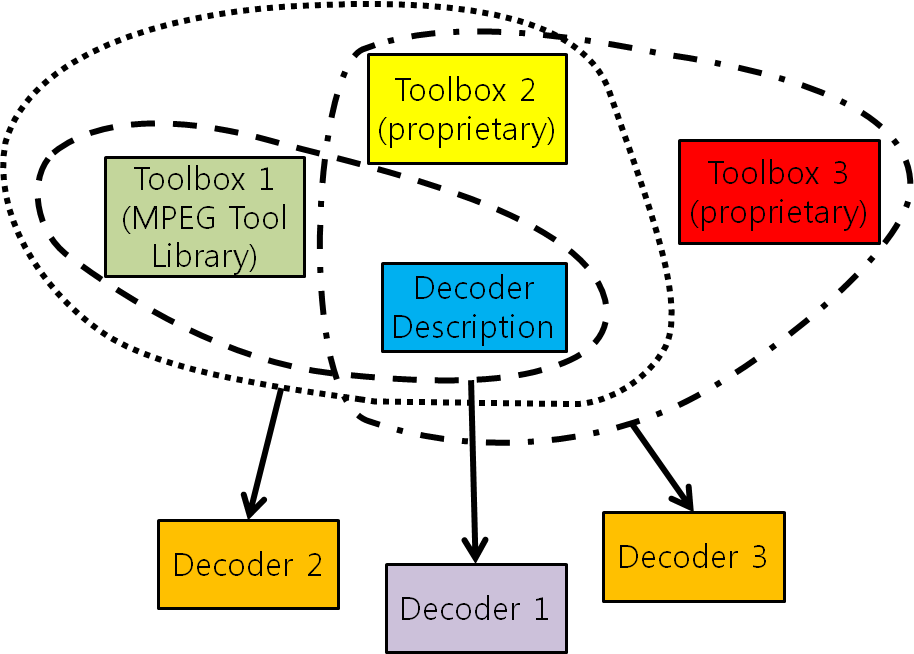
Assume now that an MPEG library (toolbox 1) and two proprietary libraries (toolboxes 2 and 3) have been developed for a specific platform: A service provider can distribute video content for three types of decoders implemented in that platform (see Figure 7)

RVC_conformance

Figure 7 – How to build different decoders based on the RVC standard

  • Decoder 1 is a decoding solution based on MPEG-B pt. 4 that employs tools drawn from the MPEG tool library of MPEG-C pt. 4 (toolbox 1)
  • Decoder 2 is a decoding solution based on MPEG-B pt. 4 that employs tools drawn from the MPEG-C pt. 4 tool library (toolbox 1) and a proprietary library (toolbox 2)
  • Decoder 3 is a decoding solution based on MPEG-B pt. 4 using tools drawn from a proprietary tool library (toolbox 3)

All the three decoders can be defined to be “MPEG decoders”, with the following understanding,

  • Decoder 1 may conform to MPEG-B pt. 4 and MPEG-C pt. 4 and to a specific MPEG standard if the decoder solution uses only the tools prescribed in that MPEG standard
  • In any case decoder 1 conforms to MPEG-B pt. 4 and MPEG-C pt. 4
  • Decoders 2 and 3 only conform to MPEG-B pt. 4

Therefore a decoder solution based on the RVC standard can have 3 levels of conformance

  1. To MPEG-C pt. 4
  2. To MPEG-C pt. 4 and MPEG-B pt. 4
  3. To MPEG-C pt. 4, MPEG-B pt. 4 and to a specific MPEG Video coding standard.

The RVC work has been extended to other media, in particular 3D Graphics Coding.


MPEG-4 Inside – Graphics

At the Tokyo meeting in July 1995 Hiroshi Yasuda showed up and proposed to address the coding of information that is partly natutal (e.g. a video, a music) and partly synthetic (e.g. 2D and 3D graphics). Work started in earnest, first as part of the AOE group and then, after Cliff Reader left MPEG, in the Synthetic-Natural Hybrid Coding (SNHC) subgroup. Peter Doenges of Evans and Sutherland, a company that had played a major role in the early years of development of the 3D Graphics industry, was appointed as its chairman. The results of the first years of work were 2D and 3D Graphics (3D mesh) compression, Face and Body Animation (FBA), Text-To-Speech (TTS), (Structured Audio Orchestra Language (SAOL), a language used to define an “orchestra” made up of “instruments” downloaded in the bitstream and Structured Audio Score Language (SASL), a rich language with significant more functionalities than MIDI.

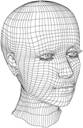
A face object  is a digital representation of a human face intended for portraying the facial
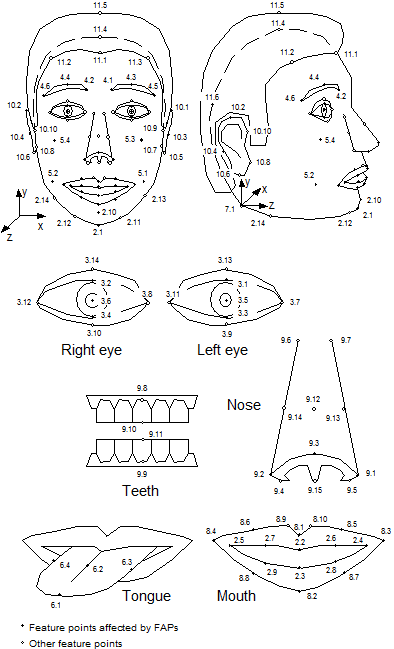
expression of a real of imaginary person while it moves e.g. as a consequence of his speaking activity. A face object is animated by a stream of face animation parameters (FAP)  encoded
at low bitrate.  The FAPs control key feature points in a mesh model of the face to produce
animated visemes for the mouth (lips, tongue, teeth), as well as animation of the head and facial features like the eyes.  A face model can also be manipulated at the receiving end.

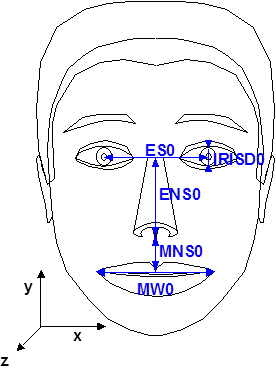
It is possible to animate a default face model in the receiver with a stream of FAPs or a custom face can be initialized by downloading Face Definition Parametres (FDP)  with specific background images, facial textures and head geometry.

The ‘facial animation object’ can be used to render an animated face. The face object contains a generic face with a neutral expression that can be rendered as is. The shape, texture and expressions of the face are controlled by Facial Definition Parametres (FDP) and/or Facial Animation Parametres (FAP).
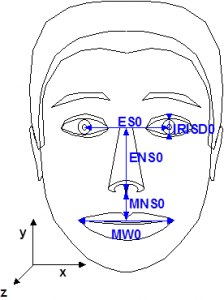
fdp

Figure 1 – Face Definition Parametres

Upon receiving the animation parameters from the bitstream, the face can be animated: expressions, speech, etc. and FDPs can be sent to change the appearance of the face from something generic to a particular face with its own shape and texture. If so desired, a complete face model can be downloaded via the FDP set. However, face models are not mandated by the standard. It is also possible to use specific configurations of the lips and the mood of the speaker.
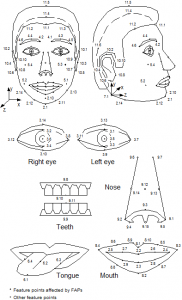
face_definition_parametres

Figure 2 – Face Animation Parametres

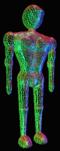
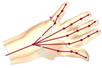
The Body is an object capable of producing virtual body models and animations in the form of a set of 3D polygonal meshes ready for rendering. Here, too, we have two sets of parameters defined for the body: the Body Definition Parametre (BDP) set, and the Body Animation Parametre (BAP) set. The BDP set defines the set of parametres to transform the default body to a customised body with its surface, dimensions, and (optionally) texture. The BAPs will produce reasonably similar high level results in terms of body posture and animation on different body models.

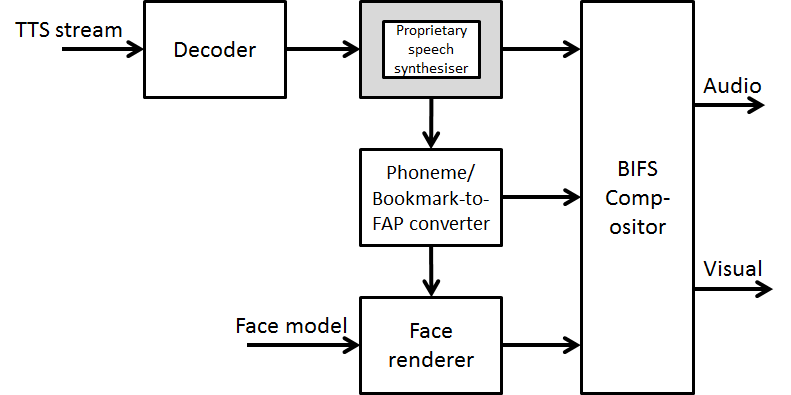
In the area of synthetic audio two important technologies are available. The first is a Text To Speech (TTS) Interface (TTSI), i.e. a standard way to represent prosodic parameters, such as pitch contour, phoneme duration, and so on. Typically these can be used in a proprietary TTS system to improve the synthesised speech quality and to create, with the synthetic face, a complete audio-visual talking face. The TTS can also be synchronised with the facial expressions of an animated talking head as in Figure 3.
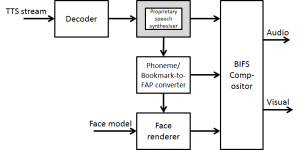
Face_and_TTS

Figure 3 – TTS-driven Face Animation

The second technology provides a rich toolset for creating synthetic sounds and music, called Structured Audio (SA). Newly developed formats to specify synthesis algorithms and their control, any current or future sound-synthesis technique can be used to create and process sound in MPEG-4.

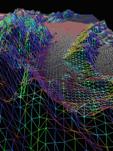
3D Mesh Coding (3DMC) targets the efficient coding of 3D mesh objects, polygonal model that can be represented in BIFS as IndexedFaceSet, a node representing a 3D shape constructed with faces (polygons) from a list of vertices, and Hierarchical 3D Mesh node. It is defined by 1) vertice positions (geometry), 2) face and its sustaining vertices association (connectivity), and optionally by 3) colours, normals and texture coordinates (properties).
3DMC can operate in a basic mode with incremental representations of a single resolution 3D model, and in optional modes:  1) support for computational graceful degradation control; 2) support for non-manifold model; 3) support for error resilience; and 4) quality scalability via hierarchical transmission of levels of detail with implicit support for smooth transition betw
een consecutive levels.

At the Melbourne meeting in October 1999 Euee S. Jang, then with Samsung, took over from Peter to complete FBA and address the important area of 3D mesh compression, in particular efficient encoding of generic 3D model animation framework, later to be called Animation Framework eXtension (AFX) and to become part 16 of MPEG-4. At the Fairfax meeting in March 2002 Mikaël Bourges-Sévenier took over from Euee to continue AFX and develop Part 21 MPEG-J Graphics Framework eXtensions (GFX).

The MPEG-4 Animation Framework eXtension (AFX) — ISO/IEC 14496-16 — contains a set of 3D tools for interactive 3D content operating at the geometry, modeling and biomechanical level and encompassing existing tools previously defined in MPEG-4. The tools available in AFX and related illustrations are summarized in Figure 1.

Tool name Objective Example
Parametric curve and surface representations Delivering smooth shapes with a high level deformation control  synthetic_face
Subdivision Surfaces Simplification and progressive transmission of large scale models Subdivision_Surfaces
MeshGrid Surface Representing generic models preserving volume information, and offering versatile manipulation features  MeshGrid_Surface1MeshGrid_Surface2
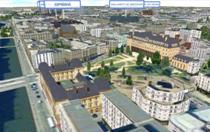
Footprint Based Representation Simplification and progressive transmission of object based on footprints (buildings, cartoons, etc)  Footprint-Based_Representation
Depth Image-Based Representation 3D photorealistic display of objects from a set of images  Depth_Image-Based_Representation
Depth Image-Based Representation Version 2 High-quality rendering of image- and point-based objects  Depth_Image-Based_Representation_V2-1Depth_Image-Based_Representation_V2-2
Multi-Texture Provide multiple textures for natural appearance together with view-adaptive real-time weighting Multi-Texture
Morphing space Combining bilinear interpolation of several target shapes with a base shape in order to obtain precise deformations and smooth animation Morphing_space1 Morphing_space2
Solid Modeling Combining simple 3D primitives for a compact and exact analytical representation of manufactured and architectural models Solid Modeling1
Deformers Enabling controlled non rigid displacements  Deformers
Bone-Based Animation Modeling and animation of generic articulated 3D objects Bone-Based_Animation1 Bone-Based_Animation2

Figure 4 AFX tools

At the Hong Kong meeting in January 2005 Mahnjin Han took over from Mikaël especially to continue the AFX activity.

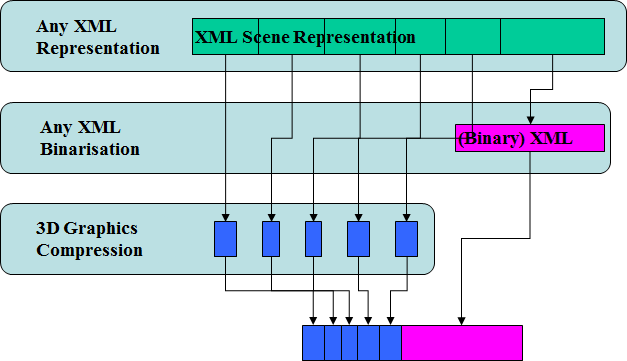
At the Marrakesh meeting in January 2007 Marius Preda took over from Mahnjin. Besides continuing the AFX activity Marius proposed a new area of work called 3D Graphics Compression Model with the goal of specifying an architectural model able to accommodate third-party XML based description of scene graph and graphics primitives, possibly with binarisation tools and with MPEG-4 3D Graphics Compression tools specified in MPEG-4 part 2, 11 and 16.
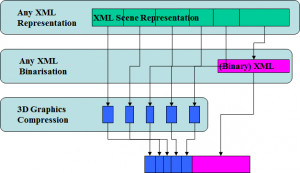
3dg_model

Figure 5 – 3DG Compression Model

This layers of this architecture are (numbering from the low layer)

  1. Layer 3: any scene graph and graphics primitive representation formalism expressed in XML
  2. Layer 2: the binarised version of the XML data not encoded by the MPEG-4 elementary bitstreams encoders (e.g. scene graph elements), encapsulated in the “meta” atom of the MP4 file
  3. Layer 1: a range of compression tools from MPEG-4 part 11 and 16
Interaction Between Real And Virtual Worlds

Digital Media started with the digitisation of audio, video and images. But Digital Media is not confined to audio, video and images. So the MPEG-4 mission has been about implementing a plan to add more and more media types: composition, characters and font information, 3D Graphics etc. Other standards, like MPEG-7 and MPEG-21 have added other aspects of Digital Media. 3D Graphics, in particular, has led to very significant examples of “virtual worlds” some giving rise to new businesses, as was the case of much-hyped Second Life where people, numbering millions at one time, could create their own alter ego living in a virtual space with its economy wher “assets” could be created, bought and sold.

Often digital media content may also need to stimulate senses other than the traditional sight and hearing involved in common audio-visual media. Examples are olfaction, mechanoreception (i.e. sensory reception of mechanical pressure), equilibrioception (i.e. sensory reception of balance ), or thermoception (i.e. sensory reception of themperature), some of which have become common experience in handsets . These additions to the audio-visual content (movies, games etc.) involve other senses that enhance the feeling of being part of the media content to create a user experience that is expected to provide greater value for the user.

Virtual worlds are used in a variety of contexts (entertainment, education, training, getting information, social interaction, work, virtual tourism, reliving the past ecc.) and have attracted interest as important enablers of new business models, services, applications and devices as they offer the means to redesign the way companies interact with other entities (suppliers, stakeholders, customers, etc.).

The “Media context and control” standard, nicknamed MPEG-V, provides an architecture and the digital representation of a wide range of data types that enable interoperability between virtual worlds – e.g., a virtual world set up by a provider of serious games and simulations – and between the real world and a virtual world via sensors and actuators. Figure 1 below gives an overview of the MPEG-V scope.

general_mpeg-v_model

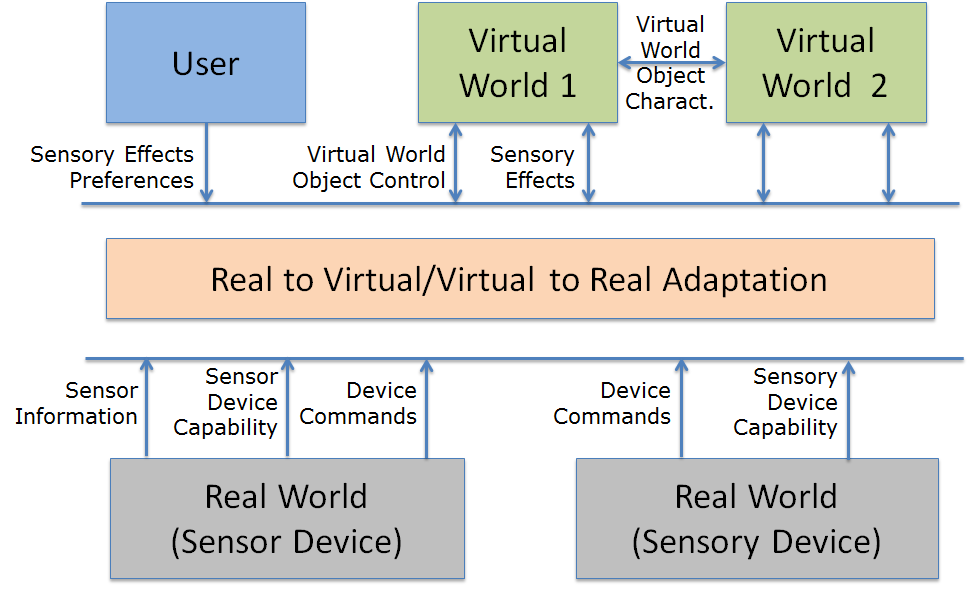
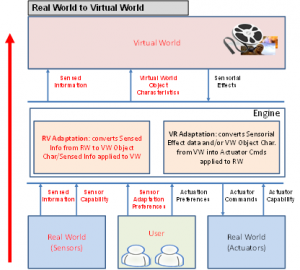
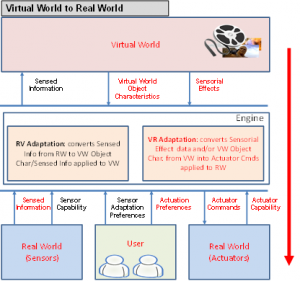
Figure 2 shows which technologies are standardised by MPEG-V in the interaction between virtual to real and between real to virtual interaction.

MPEG-V_R2VMPEG-V_V2R

Figure 2 – A more detailed MPEG-V model for virtual-to-real and real-to-virtual world interaction

In the MPEG-V model described in Fig. 1 the virtual world receives Sensor Effects that have been generated by some sensor and generates Sensory Effects that eventually control some actuators. In general, however, the format of the information entering or leaving the virtual world is different than the one used by actuators and sensors, respectively. For example, the virtual world may wish to communicate a “cold” feeling but the real world actuators may have different physical means to realise “cold”. The user can specify how Sensory Effects should be mapped to Device Commands and Devices can represent their capabilities: for instance, it is not possible to change the room temperature, but it is possible to activate a fan.

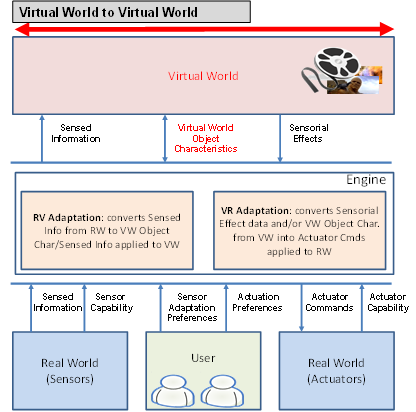
Figure 3 describes the role of “Virtual world object chacateristics” standard provided by Part 4 of MPEG-V.

MPEG-V_V2V

Figure 3 – A more detailed MPEG-V model for virtual-to-virtual world interaction

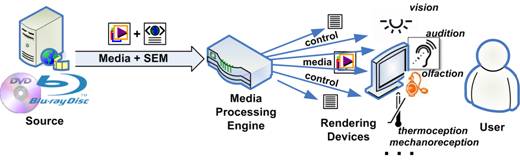
Figure 4 provides a specific example illustrating some technologies specified in MPEG-V Part 3 “Sensory Information”, namely 1) the Sensory Effect Description Language (SEDL) enabling the description of “sensory effects” (e.g. light, wind, fog, vibration, etc.) that act on human senses, 2) the Sensory Effect Vocabulary (SEV) defining the actual sensory effects and allowing for extensibility and flexibility and 3) Sensory Effect Metadata (SEM), a specific SEDL description that may be associated to any kind of multimedia content to drive sensory devices (e.g. fans, vibration chairs, lamps, etc.).

enhancing_UE

Figure 4– Use of MPEG-V SEDL for augmented user experience


Technologies To Interact With Digital Media

The user interface is a very important component of Digital Media devices, services and applications. The sleek user interface offered by Apple products is quoted as a key element for their success.

Recently user interfaces have evolved in two main directions: inclusion of more media types such as audio, video, 2D/3D graphics and rich media functionalities, and aggregating small dedicated applications called Widgets to create effective and user friendly interfaces. The “atomic” nature of widgets promises users homogeneous and unified experiences when they interact with their heterogeneous devices such as desktop computers, mobile devices, home appliances, TVs, STBs, tablets etc.

ISO/IEC 23007, also known as MPEG-U, defines a specification to exchange, control and communicate widgets with other entities. The standard is an extensions of the W3C specification for widgets packaging and configuration to support the following functionalities:

  1. Compatibility of the widget packaging format and configuration documents with the MPEG media types
  2. Transportability of widgets on any existing transport mechanisms (particularly MPEG file format and MPEG-2 TS)
  3. Applicability to domains other than Web (e.g. broadcast, mobile or home networking)
  4. Ability of a widget to communicate with other entities (including widgets) that are either remote or running in the same environment
  5. Ability to dynamically update the widget presentation or to display a widget in a dynamic and interactive simplified representation
  6. Mobility across devices while maintaining the state of the widget.

A definition of MPEG-U widget is “a self-contained computer code within a Rich Media User Interface endowed with extensive communication capabilities”.

Widgets can be processed by entities running on different devices, called Widget Managers, in charge of managing the life cycle of the widgets supporting communications with other entities locally or remotely deployed and enabling widget mobility across devices.

MPEG-U specifies normative interfaces between Widgets and Widget Managers, to allow Widgets from different service providers to run, communicate and be transferred within a unique framework.

The main elements of a Widget environment are:

Element Definition
Manager Tthe Widget “decoder” in charge of executing the Widget, communicating with Widgets or other entities
Manifest An XML description containing all the information necessary for the Manager to process the Widget
Scene Description A description of a multimedia presentation in terms of spatio-temporal layout, and interactions for use by the Widget
Presentation Engine An entity processing the Scene Description to provide an animated and interactive behaviour for the Widget
Resource A component of a Widget Manager or Presentation Engine required as a file or a stream to process and present the Widget
Package The assembly of Manifest and associated Resources formatted for a particular transport (network or storage)
Context A set of data needed to reproduce a state and preferences of a widget, e.g. after it is deactivated/reactivated, possibly by a different Manager
Representation The Full or Simplified description of the widget appearance and behaviour, expressed in a Scene Description language

The following walkthrough can be used to highlight the role of the elements defined above:

  1. The components of a Widget are available at a source
  2. A User interacting with a Device requests or, alternatively, the source pushes a particular instance of a Widget, whose components are: Manifest, Representation, Scene Description, Resources and Context
  3. The source packages the Widget for the specific transport
  4. The Widget is executed by the Manager and presented to the User
  5. The User interacts with the Widget triggering the delivery via streaming of Resources, their decoding and presentation using the Presentation Engine
  6. Interaction with User results in Context being updated
  7. The Widget may move to other Devices as a result of interaction with User and other Widgets

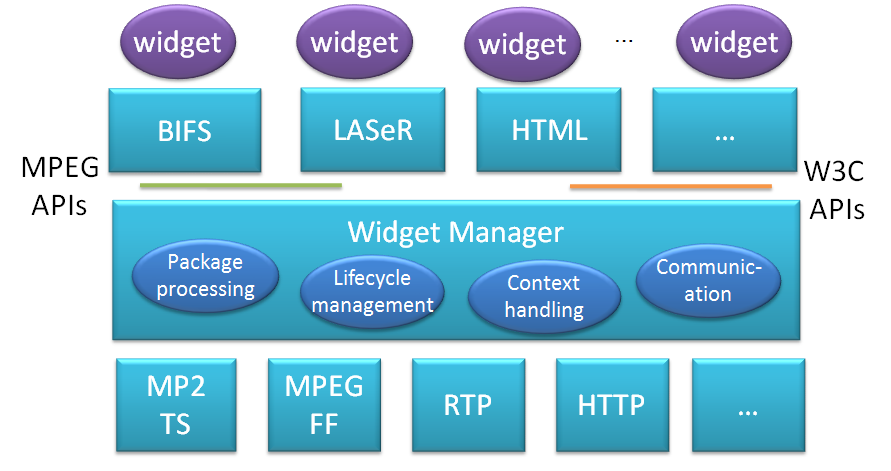
A graphical description of the MPEG-U components is provided by Fig. 1

mpeg-u_model

Fig. 1 – A graphical description of the MPEG-U components


Augmented Reality Application Format

Starting from Video, MPEG has gradually covered most of the media and related spectrum:

  1. Video technologies to efficiently represent video information.
  2. Audio technologies to efficiently represent audio information.
  3. Systems technologies holding the two together, the interfaces with transport and, in the case of MPEG-2, the transport itself.
  4. 3D scenes creation with such “objects” as 2D and 3D graphics, synthetic audio and their composition.
  5. Media metadata including the capability to detect the existence of a specified audio or video object (MPEG-7 and in particular CDVA).
  6. Reference model and the data formats for interaction with real and virtual worlds (MPEG-V).
  7. A standard for user interfaces (MPEG-U).

So MPEG is well placed to deal with two areas that have achieved notoriety and some market traction: Virtual Reality (VR) and Augmented Reality (AR). But first we need to say something about what is meant by these words

  1. Virtual reality is an environment created by a computer and presented to the user in a way that is more realistic to the extent that more intelligent software, more powerful computer and more engaging presentation technologies are used to involve more human senses obviously starting from sight and sound
  2. Augmented reality is an environment where computer-generated image or video is superimposed on a view of the real world and the result is presented to the user. 

A simple example of Augmented Reality is provided by Figure 1.

AR_on_tablet

Figure 1 – A simple example of Augmented Reality

Augmented Reality Application Format (ARAF) defines a format that includes the following elements

  1. Elements of scene description suitable to represent AR content
  2. Mechanisms for a client to connect to local and remote sensors and actuators
  3. Mechanisms to integrate compressed media (image, audio, video, graphics)
  4. Mechanisms to connect to remote resources such as maps and compressed media

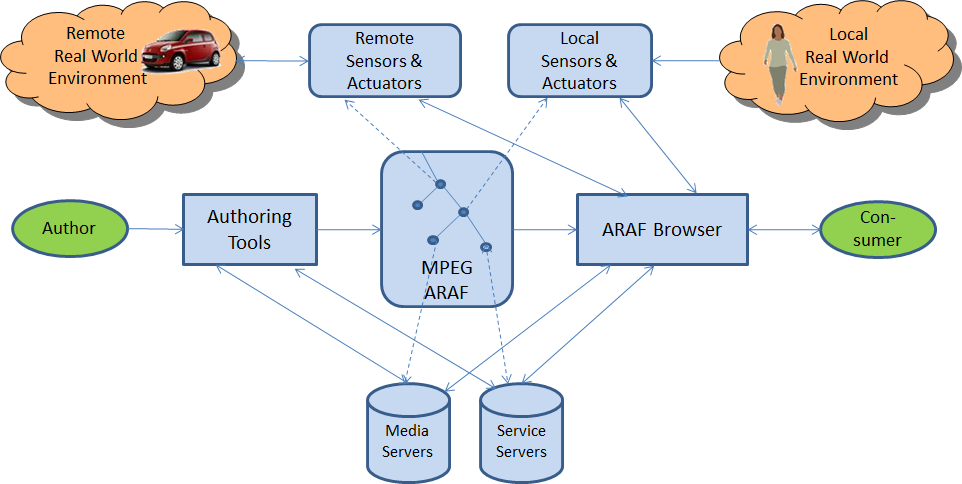
Figure 1 illustrates the scope of the standard.

ARAF

Figure 2 – Scope of the ARAF standard

From the left we have an author of the ARAF file who uses an ARAF Authoring Tool to define local interactions, access to media and service server, but also define what should happen when a person crosses a localcamera or a car crosses a remote camera.